

Will a New Refraction Unit Work with Your Existing Ophthalmic Equipment?
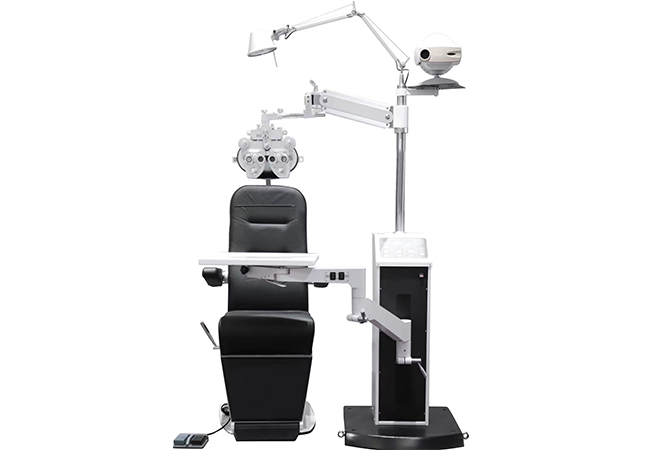
Will a new refraction unit work with the equipment your practice already owns?
Confirm each retained device’s model, mounting, load, movement, power, controls, interfaces, and room clearance in writing before ordering; same-brand equipment still needs a model-specific check.
A concise compatibility matrix turns that review into an approval record.
Which Existing Devices and Accessories Should You List Before Ordering?
The first step is an accurate inventory of what will remain, what will be replaced, and what must work together on examination day.
List every retained device, accessory, connection, and room constraint by exact model and revision; a product family name alone is not enough for a compatibility decision.
Capture the installed base
Photograph each equipment label and record manufacturer, model, serial or revision information where appropriate for the project, dimensions, approximate weight, mounting method, power input, control accessories, and current location. Include items that are easy to overlook: phoropter arms, instrument trays, chart controllers, printer shelves, foot switches, cable extensions, lens holders, and patient chairs. Do not send patient information with the enquiry.
Separate “must retain” from “preferred to retain.” A device may be technically reusable but impractical if it consumes the movement range or requires a cable path that the new unit cannot provide. Record whether a device needs independent adjustment, shared power, a data connection, or a clear line of sight to a chart.
Make the target workflow explicit
Write the sequence of a normal examination: patient entry, seating, device alignment, refraction controls, chart operation, record entry, and exit. Identify who adjusts each component and which items must move together. This prevents a matrix from becoming a list of dimensions with no operational meaning. We give each unresolved item an owner so missing measurements are collected before configuration approval.
| Inventory field | Example question | Evidence |
|---|---|---|
| Exact model | What is printed on the nameplate? | Photo and supplier record |
| Mounting | How is it attached today? | Drawing or installer note |
| Working load | What must the new unit support? | Model-specific document |
| Movement | What must lift, rotate, or slide? | Demonstration record |
| Interfaces | Which controls or power points are needed? | Connector and voltage confirmation |
The Hongdee Vision Ophthalmic Refraction Unit page is a useful starting point for a configuration conversation. It should be paired with your exact retained-equipment list, not treated as a universal promise that every existing device fits.
How Do You Check Mounting, Working Load, and Movement Clearance?
Mechanical fit is more than whether holes appear to line up. The installed unit must support the equipment safely while leaving room for examination movements and maintenance access.
Verify mounting pattern, approved load, centre of gravity, travel limits, collision risks, and service access in the proposed configuration; request drawings or a live demonstration where uncertainty remains.
Check the attachment interface
Ask how each retained instrument is mounted and whether the new unit accepts that method directly or requires an approved adapter. Compare hole patterns, fasteners, arm interfaces, tray dimensions, and the direction of applied load. A device that can sit on a surface may not be approved for a moving arm. A shelf that supports a static object may not remain stable while the table rises, lowers, or pivots.
| Mechanical item | Buyer check | Evidence |
|---|---|---|
| Mounting pattern | Holes, arms, fasteners | Drawing |
| Working load | Each device and position | Model document |
| Movement | Travel and collision envelope | Live test |
Record the weight and footprint supplied by the original manufacturer. Do not estimate from appearance or borrow a capacity value from a similar table. Confirm whether the stated load applies to one device, multiple devices, a particular arm, or a specific position. If the supplier needs more information, provide it rather than accepting a generic “universal” label.
Map the complete movement envelope
Test the highest and lowest intended positions, rotation, slide, patient entry, clinician seating, and access to controls. Mark the wall, door, chair, wheelchair, cabinet, and other equipment on a floor plan. Look for collisions between a phoropter arm and a chart, between a cable and a moving joint, or between an instrument and the patient’s head position. Leave room for cleaning and service, not only the moment of use.
A simple compatibility status can be clearer than a yes/no claim: “confirmed by document,” “confirmed in demonstration,” “requires adapter,” “requires site measurement,” or “not approved.” This protects the project from turning a provisional fit into an installation promise.
Also ask the installer to identify the service envelope around the new unit. A device may fit during use but leave too little room to tighten fasteners, inspect cables, clean behind the table, or remove a component later. Mark those access zones on the room plan and include them in the approval record, especially when furniture or walls restrict movement.
Which Power and Control Interfaces Need Written Confirmation?
Mechanical compatibility cannot answer whether the devices can be powered, controlled, or recorded together in the proposed room.
Confirm voltage, frequency, outlets, grounding, control signals, foot switches, data paths, and regional installation responsibilities in writing for each model and accessory.
Separate power from control
List the electrical input of the new unit and every retained device. Confirm the number and location of outlets, rated load, plug type, cable length, isolation or emergency controls, and whether the table’s internal power provision is intended for the proposed devices. A power strip shown in a product image is not evidence of a particular country’s electrical approval or a guarantee that all devices may be connected to it.
Controls also need their own review. Ask whether a hand control, foot switch, chart remote, phoropter controller, or interlock is independent or shared. Confirm which functions are local, which require a separate controller, and whether an adapter is approved. Physical co-location does not establish functional integration.
| Interface | Question | Written evidence |
|---|---|---|
| Power | What supply does each model need? | Electrical document |
| Control | Which device uses each controller? | Compatibility note |
| Data | Is transfer required? | Interface documentation |
Treat data as a separate project question
If the workflow includes a computer, chart controller, electronic record, or printer, identify the exact data path and software version. A shared physical workstation does not prove that information transfers between devices. If no model-specific interface document exists, state that data connectivity is unconfirmed and keep the purchase request focused on the physical setup.
We also ask the responsible installer to check the final arrangement rather than relying solely on the desk review. Record any accessory or cable substitution, and return the affected interface to review before it becomes part of the accepted installation.
Create an approval row for each interface:
| Interface | Question | Required confirmation |
|---|---|---|
| Power | Can the proposed devices share the intended supply? | Electrical document or installer review |
| Control | Which controller operates which function? | Model-specific compatibility note |
| Data | Is a transfer actually required? | Interface and software documentation |
| Safety | What happens during a fault or power loss? | Instructions and local review |
What Should a Pre-Installation Review and Final Acceptance Test Cover?
A compatibility matrix is useful only when it leads to a controlled installation and a documented handover.
Approve the configuration before delivery, inspect the installed unit against that configuration, and test the complete examination sequence with the actual retained equipment.
Hold a pre-installation review
Bring together the buyer, supplier, installer, and relevant clinical or IT contact. Review the inventory, drawings, device list, mounting method, power conditions, access route, room preparation, delivery constraints, and responsibilities for adapters or building work. Ask the supplier to identify what is included, optional, excluded, or dependent on a site visit.
Use a change log. If the practice substitutes a phoropter, chart, chair, monitor, or cable after approval, reopen the affected compatibility rows. This is particularly important when a device’s weight, mounting, controls, or movement changes. A same-brand assumption does not close a question without evidence.
| Review stage | What to check | Sign-off |
|---|---|---|
| Before delivery | Models, drawings, adapters | Buyer and supplier |
| Installation | Mounting, power, cables | Installer |
| Handover | Full examination sequence | Trained user |
Test the installed workflow
At handover, compare model labels and accessories with the approved list. Check fasteners, stability, movement range, collision clearance, cable slack, controls, power, and access for cleaning. Then perform the complete routine with a trained user: seat the patient, position the device, operate the refraction controls, use the chart, move the unit through its intended range, and return the room to its normal state. Document exceptions and assign an owner before sign-off.
| Acceptance test | Pass condition | Record |
|---|---|---|
| Mounting | Stable and approved | Installer note |
| Movement | No collision or cable strain | Trial record |
| Workflow | Retained devices operate as planned | User sign-off |
For help assembling a configuration request, contact Hongdee Vision with device labels, dimensions, drawings, and the desired workflow. You can also begin from the Hongdee Vision Ophthalmic Motorized Table page. Keep the enquiry to project equipment and workflow details, and ask for model-specific written confirmation rather than a general compatibility statement.
Conclusion
Compatibility is a documented project decision. Inventory exact models, test mechanics and interfaces, and accept the installed workflow only after the proposed combination works in the real room.